Wednesday, June 14, 2017

Facebook Adds Net Banking Option for Payment of Facebook Ads

Good news for social media marketing industry. Now you can pay for the Facebook ads with Net Banking as shown in the image below.


Accepting Net Banking payments by SBI, HDFC, KOTAK, ICICI and AXIS Bank.

How to Give Author/Users the right to embed in WordPress

The capability you are after is called unfiltered_html. Some options:
  1. Modify author capabilities in your theme functions.php. This is saved in the DB, so you can access a page, make sure it works then remove it from your functions.phpfile. A better option would be to run it on theme activation. See this page on WP Codexfor options:
  2. function add_theme_caps() {
        // gets the author role
        $role = get_role( 'author' );
    
        // This only works, because it accesses the class instance.
        // would allow the author to edit others' posts for current theme only
        $role->add_cap( 'unfiltered_html' ); 
    }
    add_action( 'admin_init', 'add_theme_caps');

Thursday, April 14, 2016

How to Add a Category in WordPress Blog

To add a category in WordPress blog you must have to follow the steps mentioned below :
  1. Login to your WordPress account exp : http://www.yoursite.com/wp-admin Press Enter to login to your website.
login-wordpress
2. Now you can see your dashboard as like in the image :
dashboard
3. Now you have to hover on post tab and simply you can find the categories option over there. Exp:
category-option
4. Now simply click on the categories option you can see the the option to add new category, by entering the name and slug of the category you can simply add the new category to your blog. Exp:
add-category
5. Now you can categorize your each blog post using different categories you have. Exp:
post-category
So these are the simple steps to add a category and assign a particular category to each blog post.

Steps to Create a WordPress Blog Post

Steps to create a new blog post in wordpress :
  1. Log in to wordpress dashboard:  Login to wordpress dashbord account using URLhttp://yoursite.com/wp-admin.
New Post in WordPress


  1. Click Post tab : Now click to post tab to add a new post to your blog or website.
  2. Click ti Add New Sub Tab : Now go to sub tab of all post to add new post.
  3. Start filling in the blanks: enter your post title in the upper field, and enter your post body content in the main post editing box below it.
  4. As needed, select a category, add tags, and make other selections from the sections below the post. (Each of these sections is explained below.
  5. When you are ready, click Publish.
That’s it.

Tuesday, November 11, 2014

Introduction: What is WordPress?

Introduction: What is WordPress?

WordPress

What is WordPress?

 WordPress is a Content Management System as well as a free blogging tool is used for creating a blogging website.Any one can easily create a free blogging/ business website using WordPress, even if you don’t have a basic knowledge of programming language you can easily create a website using WordPress.

Thursday, September 11, 2014

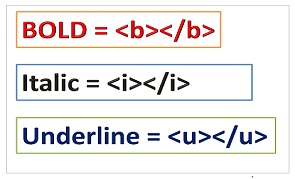
Bold Italic and Underline tag in html

biu-page-0

Bold:
To make a text bold in html we have to use bold <b> element, it is an inline element it means you can use it within the line and the effect of this tag is also applicable on the same line. The contents placed in between <b> bold tag is looks bold if you use this tag.
Example:

<!DOCTYPE HTML>
<html lang="en-US">
<head>
<meta charset="UTF-8">
<title></title>
</head>
<body>
<p>This is a Paragraph with <b>Bold</b> Tag.</p>
</body>
</html>
  Output:
bold
Italic:
To make a text italic we have to use <i> tag, it is also an inline element.
Example:

<!DOCTYPE HTML>
<html lang="en-US">
<head>
<meta charset="UTF-8">
<title></title>
</head>
<body>
<p>This is a Paragraph with <i>italic</i> Tag.</p>
</body>
</html>
Output:
italic
Undeline:
To make a text underline we have to use underline tag (<u>) it is also an inline element.
Example:

<!DOCTYPE HTML>
<html lang="en-US">
<head>
<meta charset="UTF-8">
<title></title>
</head>
<body>
<p>This is a Paragraph with <u>Underline</u> Tag.</p>
</body>
</html>
 Output:
underline

Friday, September 5, 2014

What is CSS?

What is CSS?


1 Vote


CSS stands for Cascading Style Sheet.
What CSS does?
CSS allows you to create rule’s that specify how the content of an element should appear.For example, you can specify that the background of the page is white, all paragraphs should appear in gray using the Arial typeface, or that all level one headings should be in a blue, italic, Times typeface.
We can use CSS in three way to our html page.
Inline CSS style: In this type of CSS style we have to embed style within the HTML element.
Example:
<h1 style="color:blue">Blue Heading</h1>
Internal CSS Style: In this type of CSS style we have to write CSS styles in the head section of the html page.
Example:
<!DOCTYPE HTML>
<html lang="en-US">
<head>
<meta charset="UTF-8">
<title>CSS Style</title>
<style type="text/css">
h1{
Color:Blue;
}
</style>
</head>
<body>
<h1>Blue Heading</h1>
</body>
</html>
Output:

internal_css

External Style Sheet: In this type of CSS we have to create a external page for style and save it with .css extension then embet it to the html page in the head section.
Example:

/*Cascading Style Sheets*/
h1{
color:red;
}
style.css the name of the external style sheet and we have to link this page to html page where we want to apply this style.
Example:
<!DOCTYPE HTML>
<html lang="en-US">
<head>
<meta charset="UTF-8">
<title>External Style</title>
<link rel="stylesheet" href="style.css" />
</head>
<body>
<h1>Blue Heading</h1>
</body>
</html>
Output:
external_css

What is PHP ?

PHP (recursive acronym for Hypetext Preprocessor) developed by Rasmus Lerdorf  in 1995.It is aServer-side scripting-language, and runs on server.It is used to manage dynamic content, databases, session tracking, even build entire e-commerce sites and is integrated with a number of popular databases, including MySQL, PostgreSQL, Oracle, Sybase, Informix, and Microsoft SQL Server. PHP widely used as open source general purpose scripting language and it can be easily embedded with Html.You can write the php code in the html page and embed with html elements.PHPcode specially enclosed with opening  <?php  and closing  ?> tag.We should always write php codes in between php opening and closing tag otherwise the code will not run/work.
Read more:
Best thing about PHP are it is extremely simple for newcomer and offers many advanced feature for the professional programmer/developer.
Example of  a PHP script :

<!DOCTYPE HTML>
<html lang="en-US">
<head>
<meta charset="UTF-8">
<title></title>
</head>
<body>
<?php
echo "Hello, Welcome to PHP Programming!"
?>
</body>
</html>
     Output :
first-script

Saturday, August 23, 2014

Learn CSS Step By Step

Cascading Style Sheet:
What CSS does?
CSS allows you to create rule’s that specify how the content of an element should appear.For example, you can specify that the background of the page is white, all paragraphs should appear in gray using the Arial typeface, or that all level one headings should be in a blue, italic, Times typeface.

Thursday, April 10, 2014

How to Download jQuery file and use it inside the HTML document?

Steps to Download jQuery file.

  • First of all you will go to jQuery officicial website ie. jQuery.com.


JQuery

jQuery
What is jQuery?

  • jQuery is a lightweight, "write less, do more", JavaScript library.
  • jQuery is a JavaScript library providing predefined JavaScript logics.
  • It is available with different extentions. 
  • Which was released in 2006.
  • It is free of cost open source library, if u want to use jQuery on your website you don't have to pay single penny.
  • We can call JavaScript functions by embedding this file within current application.